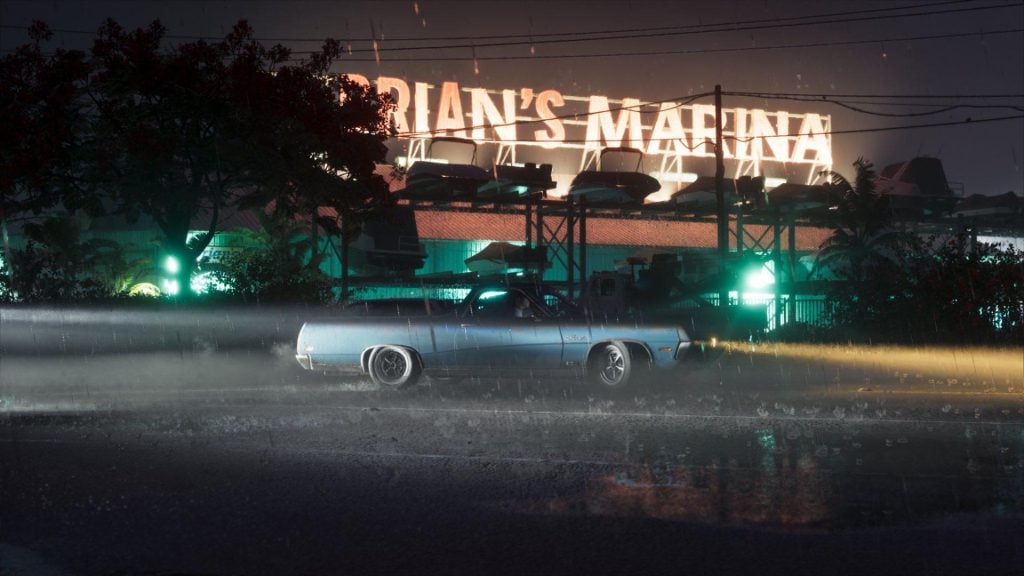
Still waiting for rain in Grand Theft Auto VI? If your version of Leonida has been stuck under blue skies since launch, you are not necessarily imagining the problem. Rockstar Games acknowledged a weather-transition issue in its November 23, 2026 update, but some players continue to report unusually long stretches of sunshine. On November 26, Insider Gaming reported that clearing the console’s temporary cache had helped some players experience changing weather again.
The important distinction is that the November 23 patch is an official fix, while clearing the cache is a player-reported workaround for lingering symptoms. Neither guarantees a thunderstorm on demand. Here is a spoiler-free troubleshooting guide for PS5, PS5 Pro and Xbox Series X|S, including what to try first and how to avoid risking your saved progress.
GTA 6 weather bug: what Rockstar has confirmed
Grand Theft Auto VI launched on November 19. Four days later, Rockstar’s official launch update notes acknowledged that the game’s weather could remain unchanged for unusually long periods. The November 23 update also addressed crashes and other unrelated gameplay problems. The notes do not announce a new weather system or promise a particular amount of rainfall.
| What players want to know | What the evidence supports |
|---|---|
| Was there a weather bug? | Yes. Rockstar listed a weather-transition fix on November 23. |
| Does the patch make rain more frequent by design? | No such adjustment has been announced in those notes. |
| Does clearing the cache help? | Some players report improvement; not an official GTA VI-specific fix. |
| Must you restart the story? | No verified requirement to do so. |
For a broader overview of the first update, see our GTA 6 November 23 patch notes guide. This article concentrates specifically on weather that still appears stuck after updating.
Before clearing the cache, check these three things
Install the current game update. An interrupted download or a console that has been offline may leave you playing an older build. Return to the console dashboard and check whether Grand Theft Auto VI has an update pending. Complete any official installation before troubleshooting further.
Protect your progress. Save through the game’s normal save system when available and check that your progress is recorded. Back up or sync your saves using your console’s supported options where possible. This is particularly important if you are planning to enter a system troubleshooting menu.
Fully restart the game. Quit GTA VI rather than simply suspending it. On Xbox, do not resume the same session through Quick Resume for this test. Restarting the application is a reasonable first step because it is quick and does not require altering console settings. Load your existing save and observe whether the environment starts to vary.
How to clear the cache on PS5 and PS5 Pro
Insider Gaming’s November 26 report describes a community-discovered workaround involving the PS5 system cache. Sony independently documents the console’s Safe Mode cache-clearing feature, although its instructions are general troubleshooting guidance, not a guarantee that GTA VI’s weather issue will disappear.
Follow the procedure in PlayStation’s official Safe Mode guide:
- Shut down the console completely and wait until the power indicator has stopped blinking.
- With the system off, hold its physical power button until the second audible beep (roughly seven seconds after the first).
- Attach your controller with a USB cable and use its PS button to enter the menu.
- Open Clear Cache and Rebuild Database, then choose Clear System Software Cache.
- After the console restarts, open GTA VI and continue from your existing save.
Important: Do not choose Reset PS5 or the system software reinstallation option. These are different operations that can erase data. A full database rebuild is also a separate function and is not necessary for the initial cache-clearing test.
Once you are back in Leonida, give the game time to run normally. Immediate rainfall is not a reliable measure of success; the goal is to see whether the world can transition between different conditions over time.
How to clear the cache on Xbox Series X and Series S
Rockstar’s official Xbox Series X|S cache instructions use a simple power cycle. Close GTA VI first and ensure that no installation or system update is running.
- Power the Xbox down using its console power button.
- Disconnect the power cable once the machine has shut down.
- Keep the console disconnected for two minutes.
- Reconnect the cable, start the Xbox and launch GTA VI again.
Rockstar says its general cache procedure preserves saves, although brightness and language preferences may return to defaults. Do not remove saved game data or factory-reset the Xbox to attempt to fix a weather symptom. Those are different and much more disruptive actions.
How to tell whether your weather is actually stuck
A convincing test should compare conditions across several free-roam sessions rather than a single mission or short drive. Changing location, observing the sky and revisiting the same location after in-game time passes can give you a better sense of whether the environment is varying. Keep track of fog and cloud cover as well as rain.
It is entirely possible for two players to have different experiences without either console being defective. Weather is intended to be variable, and one clear afternoon tells you very little. If the sky remains identical throughout a prolonged period of normal play, however, that is worth documenting.
Do not confuse a dark screen with a weather problem. If colours appear washed out or nighttime scenes are difficult to see even when the sky changes normally, consult our separate GTA 6 HDR settings guide.
What if the weather still does not change?
Record your console model, game version, story progress and the approximate amount of time you have spent observing the issue. If possible, capture a short video and explain whether it persists after a fresh launch. This information is more useful to support staff than simply stating that the game never rains.
Avoid deleting your campaign or repeatedly performing system repairs. There is no verified evidence that starting a new story is required, and repeating a workaround indefinitely may achieve nothing. Report persistent symptoms to Rockstar Support and check the official update notes for further changes.
Frequently asked questions
Does GTA 6 have a rain bug?
Yes, Rockstar acknowledged a problem with the weather remaining unchanged and addressed it in its November 23 update. Continued symptoms are still being reported by some players.
Will clearing the cache definitely make it rain?
No. It is a general troubleshooting procedure associated with improvement in some community reports, not a confirmed command that forces precipitation.
Do I need to reach a specific chapter?
No universal chapter requirement for rain has been established by the sources consulted for this guide.
Should I delete GTA 6 and reinstall it?
Not as a first step. Check updates, restart the game and try the appropriate cache procedure first. If the issue continues, seek official support before undertaking a large reinstall.
Reporting checked November 26, 2026. Featured image: official Rockstar Games promotional screenshot, as reproduced by Insider Gaming; it illustrates the game’s weather, not a tested result of the workaround.




Your perspective matters
Share your thoughts respectfully. Comments are moderated.